Benchmarks
The same screens are built with YAUI, uGUI (with TextMeshPro) and UI Toolkit, and measured on a mobile device. The code and the scene are in Assets/Benchmarks of the repository.
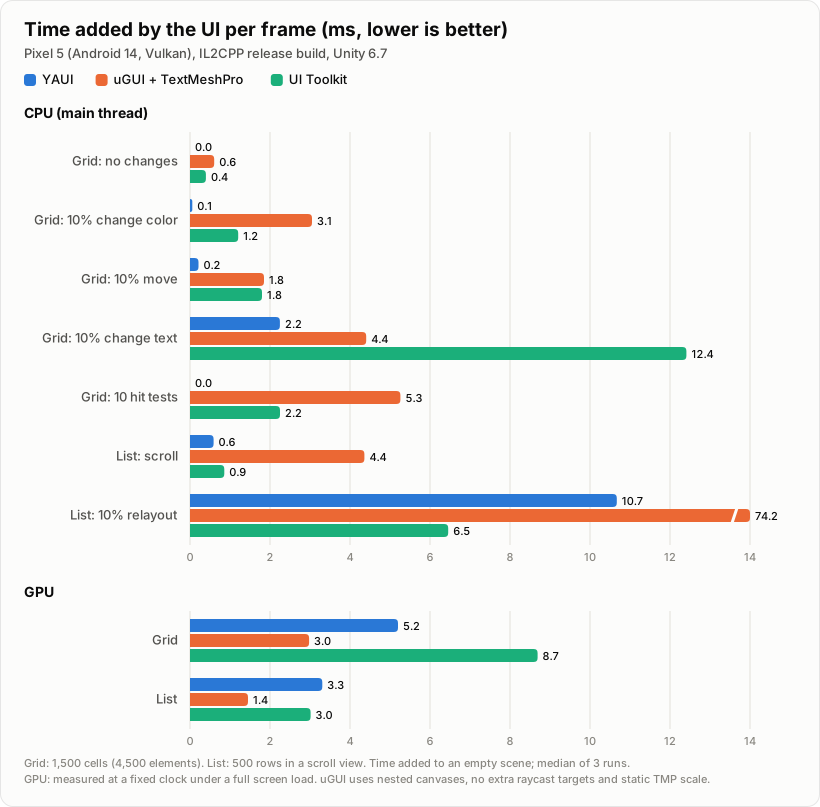
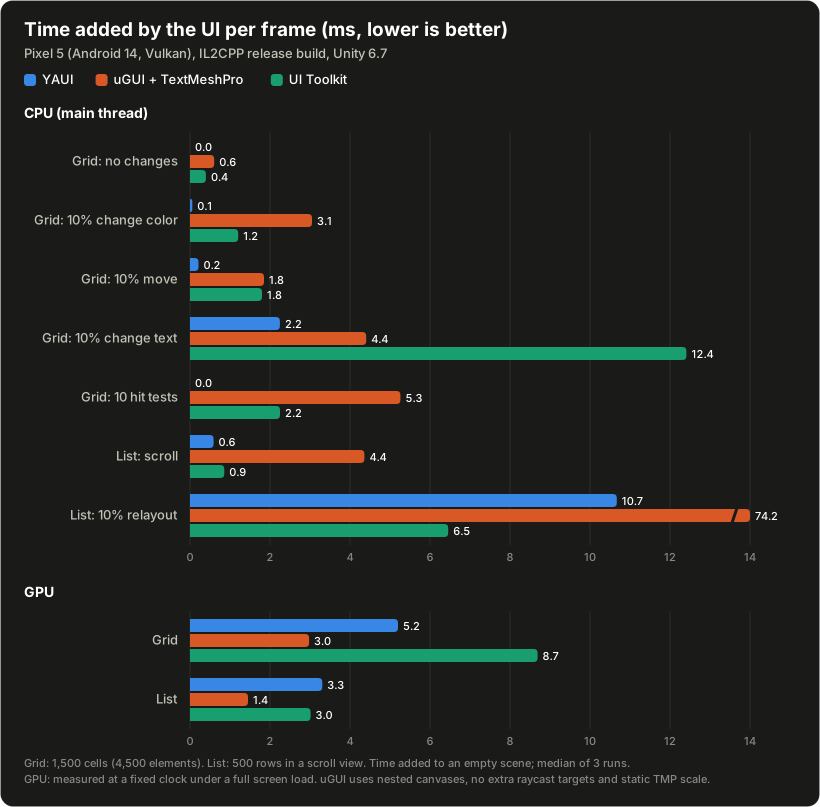
Summary
- YAUI has the lowest main thread cost in most scenarios. A frame without changes costs nothing, and changing colors, moving elements and hit testing cost less than 0.25 ms.
- Changing text costs about half of uGUI's and a fifth of UI Toolkit's.
- Layout is about 7 times faster than uGUI's layout groups, but slower than UI Toolkit (10.7 ms vs 6.5 ms added).
- GPU time is higher than uGUI's (about 1.7 to 2.3 times), which is the cost of the uber shader. It is lower than UI Toolkit's in the grid, and about the same in the list.
Environment
- Device: Google Pixel 5 (Snapdragon 765G, Adreno 620), Android 14
- Graphics API: Vulkan
- Screen: 1080 x 2340, portrait. The UI is drawn at the native resolution
- Build: IL2CPP, ARM64, release build
- Unity: 6000.7.0b2, URP 17.7.0
- YAUI: 0.2.0
Each scenario runs for 120 frames of warmup and 600 frames of measurement. All scenarios run 3 times, and the systems run one after another for each scenario in an order that changes every time, so that heat affects them evenly. The values are the median over the 3 runs of the median frame.
Scenarios
| Scenario | Content |
|---|---|
| Grid | 1,500 cells filling the screen (30 x 50). A cell is a rounded panel, a round icon and a number label: 4,500 elements |
| Grid: no changes | Nothing changes |
| Grid: 10% change color | The background color of 10% of the cells changes every frame |
| Grid: 10% move | 10% of the cells move every frame (no layout) |
| Grid: 10% change text | The label of 10% of the cells changes every frame (with the same number of digits) |
| Grid: 10 hit tests | Nothing changes; 10 hit tests every frame |
| List | 500 rows in a scroll view, not virtualized. A row is a rounded panel, a round icon, a title and a value |
| List: scroll | The list scrolls every frame |
| List: 10% relayout | The title of 10% of the rows switches between one and two lines every frame, so that the layout runs again |
Each system builds the screens in its usual way, with the same look:
| YAUI | uGUI + TextMeshPro | UI Toolkit | |
|---|---|---|---|
| Grid | Flex row with wrapping | Anchors (no layout groups: the fastest way in uGUI) | Flex row with wrapping |
| List | Flex column in a YauiScrollView | ScrollRect, RectMask2D, vertical and horizontal layout groups | ScrollView |
| Rounded corners | Box style | 9-sliced sprite (from a single texture, like an atlas) | border-radius |
| Text | YauiText | TextMeshPro | Label |
| Optimizations | Icons and labels are not raycast targets | The usual ones: changing cells in a nested canvas, icons and labels are not raycast targets, isTextObjectScaleStatic | Usage hints on changing cells, icons and labels ignore picking |
| Hit test | EventSystem.RaycastAll | EventSystem.RaycastAll | IPanel.Pick |
Results
CPU
Main thread time per frame, in milliseconds (waiting for presentation excluded). The time added to the empty scene is in parentheses.
| Scenario | YAUI | uGUI + TextMeshPro | UI Toolkit |
|---|---|---|---|
| Empty scene | 2.57 | 2.57 | 2.57 |
| Grid: no changes | 2.30 (±0) | 3.17 (+0.61) | 2.96 (+0.40) |
| Grid: 10% change color | 2.62 (+0.06) | 5.62 (+3.05) | 3.77 (+1.21) |
| Grid: 10% move | 2.78 (+0.21) | 4.42 (+1.85) | 4.37 (+1.80) |
| Grid: 10% change text | 4.81 (+2.25) | 6.97 (+4.41) | 14.98 (+12.41) |
| Grid: 10 hit tests | 2.41 (±0) | 7.83 (+5.26) | 4.82 (+2.25) |
| List: scroll | 3.16 (+0.59) | 6.93 (+4.36) | 3.42 (+0.86) |
| List: 10% relayout | 13.24 (+10.67) | 76.74 (+74.17) | 9.02 (+6.45) |
Values slightly below the empty scene are within the noise, and are shown as ±0.
The render thread takes 0.5 to 1.8 ms in all scenarios, with small differences between the systems.
GPU
The GPU changes its clock with the load, so GPU times of different scenes cannot be compared directly. Here, an expensive full screen pass keeps the GPU at its highest clock, and the UI's cost is the difference from that pass alone.
| Scenario | YAUI | uGUI + TextMeshPro | UI Toolkit |
|---|---|---|---|
| Grid | +5.20 | +2.98 | +8.69 |
| List | +3.31 | +1.45 | +3.01 |
At a lower clock, as in a normal frame, the same work takes longer.
Notes
- Text: the time to change text varies between runs (4.5 to 7.5 ms in total for YAUI).
- Layout: YAUI waits for the layout job on the main thread. The rows of the list have heights that depend on their content, so they are not layout boundaries, and the whole list is laid out again.
- In "List: 10% relayout", the rows stay about the same height, as two lines still fit in their minimum height.
- The hit test of UI Toolkit (
Pick) returns only the topmost element; the other two return all the elements under the point. - The results are from one device. They depend on the device, the graphics API and the content.
Running the benchmarks
- Import the TextMeshPro essential resources (Window > TextMeshPro > Import TMP Essential Resources).
- Build
Assets/Benchmarks/Comparison/ComparisonBenchmark.unityalone for the device. A development build also records a breakdown by profiler markers. - The app runs all the scenarios (about 25 minutes), shows the results and writes them as CSV to
Application.persistentDataPath. Assets/Benchmarks/Tools~/chart.pyprints the tables and draws the chart from the CSV.
The raw results of this page are in Assets/Benchmarks/Results~.